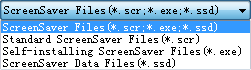
To save your creation as a self-installing ScreenSaver is easy. Please follow these steps to save a self-installing ScreenSaver:
To save your creation as a self-installing ScreenSaver is easy. Please follow these steps to save a self-installing ScreenSaver:
To save your creation as a self-installing ScreenSaver is easy. Please follow these steps to save a self-installing ScreenSaver: